
The question comes up in the first week of every new marketing setup, and people type it into search as "add patient list to crm before baa": can the team load the list now and start building campaigns? The agreement is with legal or waiting on a signature, the contact list is sitting in a spreadsheet, and the pull to get moving is real. The answer is no, and the reason is not a technicality. This post covers why, what to check in the agreement, what to do if the list is already loaded, and a safe order for the import.
HIPAA defines protected health information as individually identifiable health information that is held or transmitted by a covered entity or its business associate. A list of people who are patients of a practice that is a HIPAA covered entity, such as most dental and medical practices, says something about their health care, and it identifies them. HIPAA's de-identification rule also lists names, telephone numbers and email addresses among the identifiers that must be removed before data stops counting as identifiable. A spreadsheet of names and mobile numbers fails that test.
Practices sometimes assume only chart data counts. A contact list is smaller, but it is the same category, and a vendor that stores it, syncs it or sends messages from it is handling that data on the practice's behalf. HIPAA lets a practice share protected health information with a vendor doing that only when a business associate contract is in place. That is the BAA. Without it, loading the list is likely a disclosure HIPAA does not permit. Your counsel makes that call.
Our primer on HIPAA-compliant marketing covers the general rule of no agreement, no patient data. This post answers the specific CRM import question. The rule that applies to review requests and to ad pixels applies here too.
Signing a form does not make every feature of a CRM safe for patient data. Before anyone signs, ask the vendor, in writing, about each of these.
We do not rate any vendor's compliance in this post, and no vendor name belongs in your decision until the answers are in writing. The agreement text controls, not a sales page or a support chat.
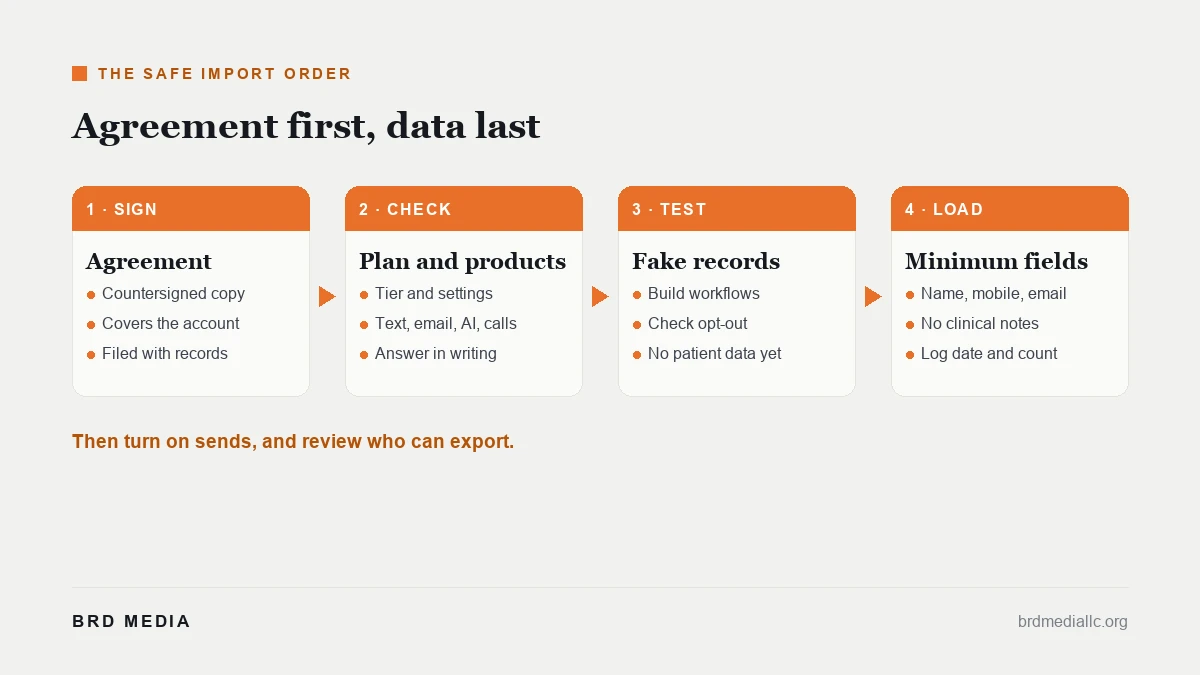
It happens, usually with good intentions. If the list went in before the agreement was signed, treat it as an incident to handle calmly and in order. The steps below are a working checklist. Your counsel decides what the law requires in your situation.
Moving fast on the first three steps matters more than finding someone to blame. A written record of a prompt pause helps counsel make the call.
| Step | Who | Proof to keep |
|---|---|---|
| 1. Sign the agreement for the account you will use | Practice leadership with counsel | Countersigned copy filed with compliance records |
| 2. Confirm plan tier, settings and covered products | Account administrator | The vendor's written answer, saved with the agreement |
| 3. Run a test import with fake records | Marketing lead | The test file and the result |
| 4. Import the minimum fields needed to do the job | Account administrator | Import log with date, count and fields |
Two things follow the table. Turn sends on only after opt-out handling is checked by the account administrator, and record who may export data, with a review each quarter. Step four also deserves a note. Import only the fields the campaign needs, such as name, mobile number and email. Leave out diagnoses, treatment notes and anything clinical. Marketing rarely needs them, and a smaller file is a smaller problem if something goes wrong.
The honest take: the cost of waiting is a few days of setup time. The cost of loading first can be a deletion request, a documented review and a conversation with counsel. If the agreement is slow, spend the wait on building the workflows with test records, writing the messages and checking opt-out handling, all of which need no patient data.
A CRM is useful once the foundation is in place. Our guide to choosing a CRM covers what to look for in general, and our medical practice marketing page shows how we build patient acquisition around these rules. Engagements start at $2,500 a month on a six-month term; the three tiers are on our pricing page. Ad spend is separate and belongs to you.
Send us the vendor and plan you are considering. We will walk through the agreement questions and a safe import order before any patient data moves.
Book a consultSources: 45 CFR 160.103, definitions (protected health information) · 45 CFR 164.514, de-identification identifiers · 45 CFR 164.504, business associate contracts · 45 CFR 164.404, notification to individuals
See BRD Media first in Google
Add us as a preferred source and our SEO breakdowns rank higher in your own Search results, AI Mode and AI Overviews.