
The tag was installed to count bookings. Somebody pasted it into the site header two years ago, the campaigns have been optimizing on it ever since, and nobody has read what it sends. Most pages in this category will tell you the rule. Few of them show you the request. So: is your med spa pixel sending PHI? This post is the inspection, in the order you would run it this afternoon.
One rail first. BRD is a marketing agency, not counsel. Nothing here says whether a specific clinic is compliant with anything. It shows you what the browser sends, what each piece means and what to change. What that means for your clinic legally is a conversation with your lawyer, with the payload printed out in front of you.
Two rules, from two different places. First, Meta's own Business Tools Terms: the business agrees it "will not share Business Tool Data" that "includes or is based on, directly or otherwise, health information." That is a contract term with the platform, it covers the pixel and the Conversions API, and it does not care whether HIPAA applies to you. Second, the health-privacy rules, where the ground moved. The 2022 bulletin on tracking technologies from HHS's Office for Civil Rights treated an IP address plus a visit to a public page about a health condition as protected information; in June 2024 a federal court vacated that part of the guidance, and the American Med Spa Association's read is that for a page not behind a login, the IP address alone is not protected health information. Our HIPAA-compliant marketing primer covers the rules layer in full, and its line is stricter than this post: for a practice that is a HIPAA covered entity, it keeps third-party tags off scheduling pages entirely. If counsel tells you that is your clinic, follow the primer on the booking page. What this post is about is the data your site hands over on purpose: names, emails, phone numbers and treatment interest. Meta's terms bar health information whatever the ruling says, and no ad platform will sign a business associate agreement for it.
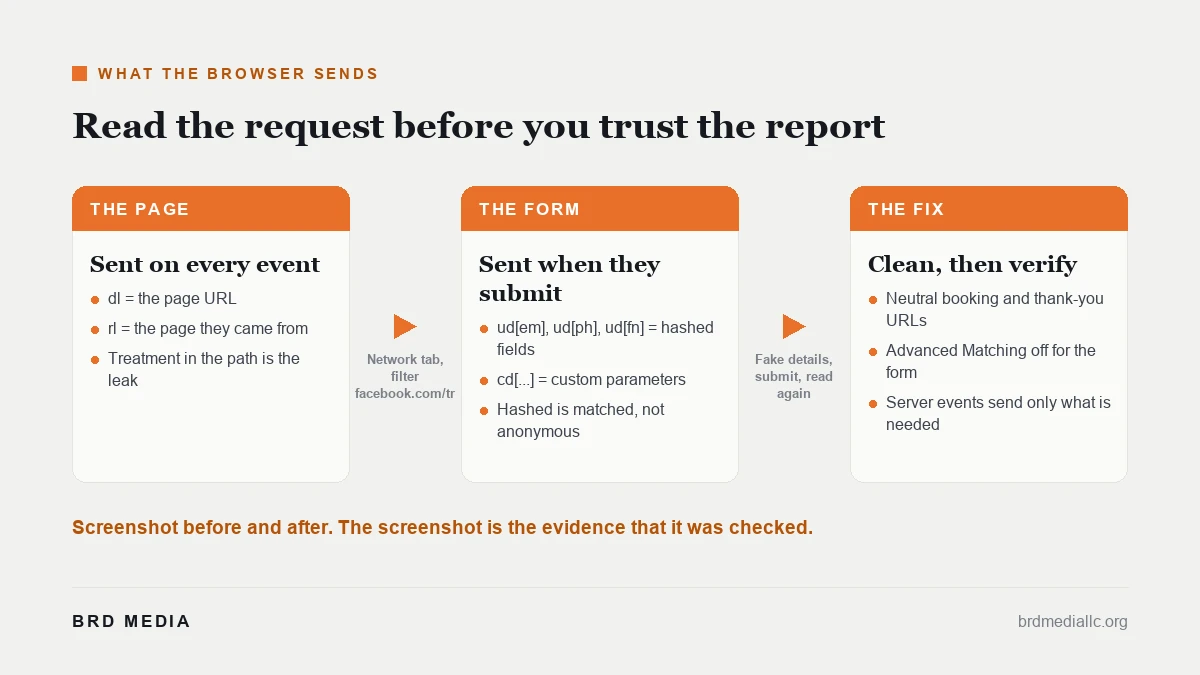
Open your own booking page in Chrome. Right-click, choose Inspect, and open the Network tab. In the filter box type facebook.com/tr. Reload the page. Every row that appears is one request from your visitor's browser to Meta. Click one and read the query string on the right. Then fill the booking form with a fake name, a fake email and a fake phone number, submit it, and watch the new rows arrive. Meta's own browser extension, Meta Pixel Helper, shows the same events in a friendlier list, but the Network tab shows you the raw request, which is what you want.
Each request carries a handful of fields, and five of them matter here.
| What you see in the request | What it means | Is it a problem? | The change to make |
|---|---|---|---|
ev=PageView, ev=Lead, ev=Schedule | The event name the pixel fired | The name itself is fine; the event becomes a problem when it rides with the rows below | Keep the event, clean what travels with it |
dl=https://yourclinic.com/book/botox-consult | The page URL, sent on every event | Yes if the path or query string names a treatment, a condition or a program | Move booking to a neutral URL such as /book/ and pass the treatment choice inside the form, not the address bar |
rl= followed by a URL | The referrer, the page the visitor came from | Same test as the URL: a referrer of /treatments/weight-loss/ says what the booking is for | Neutral booking URL fixes most of it; a referrer policy on the booking page fixes the rest |
ud[em]=, ud[ph]=, ud[fn]= with long hex strings | Hashed email, phone and first name captured from form fields by Automatic Advanced Matching | Yes, when it travels with a treatment-named URL, event or parameter. Hashing hides the value in transit; it does not make it anonymous to the platform, which matches it to a person | Turn off Automatic Advanced Matching for this pixel, or switch off the individual fields it collects, and confirm the ud[] rows disappear |
cd[content_name]=, cd[value]= and other cd[] rows | Custom parameters a developer or plugin attached to the event | Yes if the value names a treatment, a dose, a body area or a price tied to one | Strip the parameter, or replace it with a neutral label such as "consult" |
Those rows are the facts your counsel needs to answer the question in the title for your clinic. If the URL is neutral, the ud[] rows are absent and the custom parameters are blank, the pixel is sending an anonymous event and a page view. If any of them name a person or a treatment, you have found the leak, and you found it without paying anyone.
The URL is the leak nobody thinks about because no form was filled. The pixel sends the page address on every PageView, and a med spa site is full of addresses that say exactly what the visitor is considering: /treatments/lip-filler/, /semaglutide-program/, /book?service=laser-hair-removal. On a public treatment page that is a visitor reading about a service, and after the 2024 ruling the association's view is that the address plus an IP is not protected information on its own. Meta's own rule is the one that does not move: its page on prohibited information lists medical procedures and treatments as information advertisers must not share, and names URL parameters and custom data among the places it must not appear. A URL like /book/botox-consult sends the booking request and the reason for it in one line.
The fix is structural and cheap. One booking URL, no treatment in the path, no treatment in the query string. The treatment is chosen inside the form, and that field is one of the ones the next section tells you to keep out of the request. While you are at it, check the thank-you page: /thank-you-botox/ undoes the work.
Automatic Advanced Matching is a pixel setting, on by default in many setups, that reads form fields it recognizes, hashes the values and attaches them to the event so the platform can match the conversion to a person. It is useful for a retailer. On a med spa booking form it means the email, phone and name of someone requesting a consultation about a specific treatment travel to the platform in the same request as the treatment itself. The platform's terms say not to send health information; your developer never wrote a line of code to send it; the setting did.
Turn it off for the booking form and the measurement does not die. A Lead or Schedule event with no user data still counts the conversion, still optimizes the campaign, and still attributes inside the platform's click window. You lose some match quality on cross-device conversions. That is the trade, and it is the right one for a clinic. Campaigns still optimize on that clean event; how we structure the rest of a med spa account is on our Facebook ads for med spas page.
Meta's Conversions API moves the sending from the visitor's browser to your server, and server events are processed like pixel events on Meta's side. That gives you control the browser never had: your server decides which optional fields go in the request. Meta still requires a few on every website event, including the page URL and the browser's user agent, but nothing from the form has to travel with them. It also keeps working when browsers block third-party scripts.
Three things it does not fix. It does not change the rule: health information sent from a server is still health information under the platform's terms. It does not clean the page URL: Meta requires the page address on every website server event, so a treatment-named URL travels from your server exactly as it did from the browser. And it does not remove the browser pixel; most setups run both, so a server-side build with the browser pixel left on default has moved nothing. Every account under our Meta ads management gets pixel and Conversions API setup; on a clinic account the browser pixel is the thing to audit first, which is the order this post runs in.
Write it as five lines, because a developer with a list finishes in an afternoon and a developer with a concern finishes next quarter. One: move booking and thank-you pages to neutral URLs with no treatment in path or query. Two: turn off Automatic Advanced Matching for the pixel, or switch off the individual fields it collects. Three: remove every custom parameter from Lead and Schedule events except a neutral label. Four: if a Conversions API is in place, list the exact fields each server event sends and remove anything naming a treatment or a person beyond what the platform requires for the event. Five: check that no pixel fires at all on any page behind a patient login.
Verification is the same ten minutes as the inspection, repeated. Network tab, filter, reload, fill the form with fake details, submit. The dl value is neutral, the ud[] rows are gone, the cd[] rows are blank or neutral. Screenshot the before and the after and keep both with your counsel's file; the screenshot is the evidence that the configuration was reviewed and changed on a date. Review requests and their own data rules are a separate surface, covered in our HIPAA-safe Google reviews post.
The honest take: on some pages the right answer is no tag at all. A patient portal, an intake form that asks medical history, a post-treatment instructions page: nothing you learn from a pixel there is worth what it sends. Measure the booking, and leave the care pages dark.
Premier IV is the proof we point to. A compliant, multi-location GLP-1 patient acquisition engine, built on LegitScript certification and Meta prescription drug authorization, delivered 99 qualified leads, 12 or more new patients at roughly a 12 percent lead-to-patient rate, and $80,496 or more in cohort lifetime value at $6,708 per patient over twelve months. Compliance was the thing that let it scale.
Open the booking page, Network tab, filter facebook.com/tr, reload, read. Fill the form with fake details and read again. Write down what the dl, ud[] and cd[] rows say. Hand the five-line change list to whoever owns the site. Repeat the inspection when they say it is done. Then take the two screenshots to your counsel and let them answer the legal question with the facts in hand. Is your med spa pixel sending PHI? After today you will know exactly what it sends, and your counsel will have the proof to answer that question either way.
Engagements start at $2,500 a month on a six-month term; the three tiers are on our pricing page. Ad spend is separate and belongs to you.
Send us the booking page. We will read the requests on a call and hand you the change list.
Book a consultSources: Meta Business Tools Terms · Meta Business Help Center, about prohibited information · Meta for Developers, Conversions API overview · American Med Spa Association, are Facebook and Google tracking pixels HIPAA compliant
See BRD Media first in Google
Add us as a preferred source and our SEO breakdowns rank higher in your own Search results, AI Mode and AI Overviews.