
The med spa waitlist vs online booking question comes up whenever a practice gets busy: should a new visitor from Google book any open slot, or join a list and wait for the team to place them? Software descriptions often say the two are complementary, and that is true in a back office. It leaves the real question open: what should the first visit from search find? This post lays out what a search visitor wants, where each approach breaks, and a two-week test a spa can run with its existing tools.
Think about the person who typed a treatment and your area into Google, read a few pages and landed on yours. They have a rough idea of what they want. They have not decided to commit, and they are probably comparing at least one other spa in another tab. What they want from the calendar is simple:
That list explains most of what follows. A calendar that shows an open slot fits the second item. A waitlist fits it if the reply is fast. Neither fits if the visitor has to guess which service to choose or what happens next. Our post on the consult show rate covers what happens after the booking, such as reply speed, reminders and deposits. This one covers the step before it.
Open booking works well for a treatment with a fixed length, one provider and a simple room setup. It strains when the calendar hides complexity the visitor cannot see.
None of these means open booking is wrong. They mean it needs rules: a limited set of bookable services, buffer time between appointments, a minimum notice period and a consult-first path for new treatments. If the booking tool cannot enforce those rules, the team enforces them by phone, and the speed advantage disappears.
A waitlist makes sense when demand exceeds what the team can deliver. A list for a popular provider, a seasonal treatment or a new device can add to the sense that the spa is in demand. The risk sits with the visitor who arrives ready to book on a Tuesday afternoon and gets a message that says "we will be in touch".
One detail worth knowing: Google's own documentation says the waitlist feature on a Business Profile is only available to restaurant businesses. A med spa waitlist therefore lives on your own site or in your booking tool, not inside Google. Google's help page on setting up bookings through a provider also notes that performance data is not available for custom booking links, which is one more reason to count what happens on your own pages.
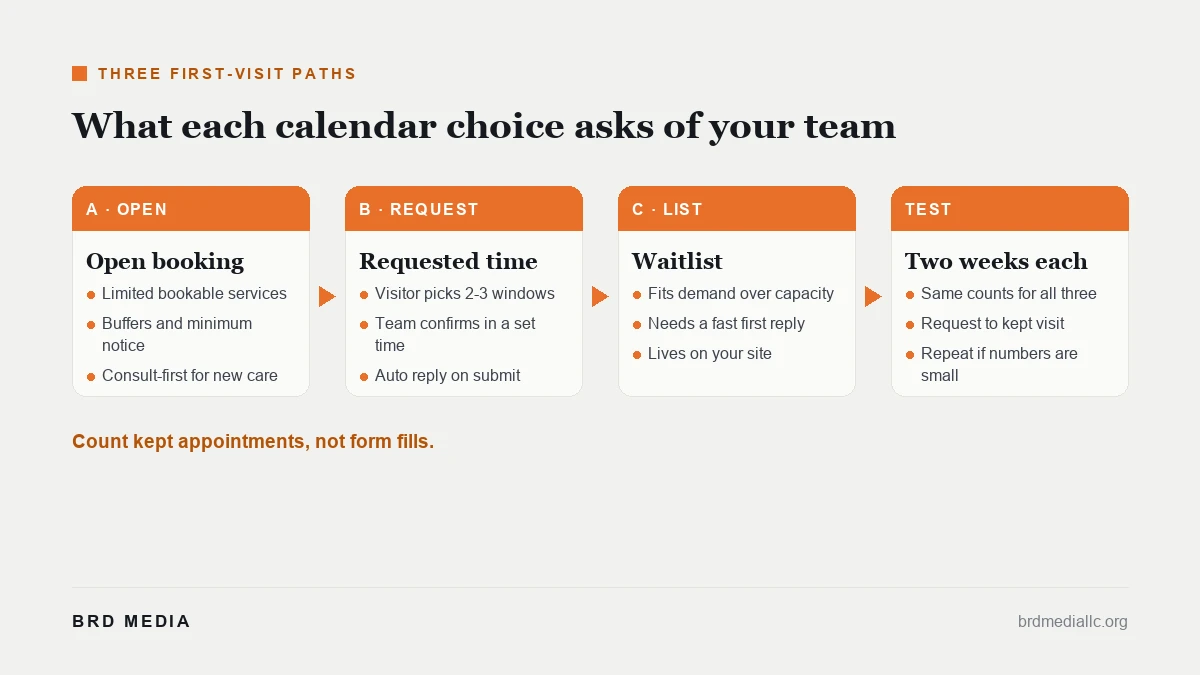
A requested-time process sits between the two. The visitor chooses a service or says "not sure", picks two or three windows that suit them, and submits. The team confirms one of those windows within a stated time, such as the same business day, and the visitor receives a message that says exactly that. Your team controls the schedule, and the visitor gets a promise instead of a blank wait.
It suits spas where treatments need specific providers or rooms, where first visits should start with a consult, or where the calendar is too complex to expose in full. It fails when the promised reply window is not kept, which is why the promise should be something the front desk can honor on its busiest day, not its average one.
Run each version for two weeks, one after the other, and measure the same things for each. Alternating weeks is simpler than splitting traffic, and it works with most tools. Count what happened, not what the tool's dashboard says.
| Version | What it changes | What to count | How to read it |
|---|---|---|---|
| Open booking with rules | Visitor picks an open slot from a limited list | Visits to the booking page, bookings made, bookings kept | Look for a high start-to-booking rate paired with many reschedules or no-shows |
| Requested time | Visitor submits windows, team confirms | Requests made, time to confirm, confirmed, kept | Look for requests that go cold between submit and confirm |
| Waitlist | Visitor joins a list, team places them later | Sign-ups, days to first contact, booked from the list, kept | Look for how many people booked elsewhere before you replied |
Record the source of each visit alongside the result. Google Analytics 4 groups visits into channels, and its default channel group definitions explain what each one means, so you can compare search visitors with everyone else. A tester who sends only paid traffic through one version and organic through another will draw the wrong conclusion.
Do not call the result from a handful of bookings. Two weeks is the least you can run, not a guarantee of enough data. If the counts are small, repeat each version once more and see whether the same pattern holds. A pattern that repeats means more than a number that jumps.
The words around the calendar do as much work as the calendar. Four lines carry most of it:
Also check the page on a phone, since many visitors will use one. Count the taps from the landing page to a finished request. If it takes more than a handful, the version of the calendar you chose matters less than the length of the path to it. A short form with a clear promise outperforms a clever calendar behind five screens.
The requested-time and waitlist paths both depend on a person answering. Decide who owns the inbox for requests, what the target reply time is and what happens when that person is away. Send an automatic confirmation message the moment the form is submitted, so the visitor knows it arrived. Then track the time from request to first reply. If the average drifts past the window you promised, shorten the promise or add coverage, because a missed promise does more damage than a longer one honestly kept.
The honest take: there is no universal winner. A spa with one provider and a simple menu may do best with open booking. A spa with several providers and a complicated room schedule may do best with a requested time. A spa with more demand than capacity may use a waitlist for one treatment and open booking for the rest. The test tells you which description fits your calendar.
The calendar is where search traffic turns into appointments, so a med spa waitlist vs online booking decision belongs next to your ads and your local listing, not after them. Our med spa lead generation work covers follow-up, reminders and kept appointments, so the calendar choice sits inside a system that is measured past the form fill. Our med spa marketing page shows the wider system, and med spa marketing strategies covers where to spend first. Engagements start at $2,500 a month on a six-month term; the three tiers are on our pricing page. Ad spend is separate and belongs to you.
Send us your current booking steps. We will mark where search visitors drop off and set up a two-week test.
Book a consultSources: Google Business Profile Help, Set up bookings through a provider · Analytics Help, Default channel group
See BRD Media first in Google
Add us as a preferred source and our SEO breakdowns rank higher in your own Search results, AI Mode and AI Overviews.