
Med spa · Google profile
Edit in place, match every public source, never open a second listing
UpdatedA med spa changes hands, adds a medical director, drops a founder's name or grows out of a name that no longer fits. Then someone asks the question that stops the paperwork: if we change the name on Google, do the reviews go with it? The reviews are the part of the profile that took years to earn, so the fear is reasonable. This post covers how to change a Google Business Profile name for a med spa without putting that asset at risk. It covers what Google says about name changes and why a new listing is the wrong fix. It also covers the checklist to finish before you submit. Then it explains what to do if Google sends the edit back, and how to recover if a second profile already exists.
Google's help page on moving reviews across Business Profiles has a short section on name changes. It says that if a business makes a minor name change, or a business with multiple locations changes its name, the reviews remain. It then adds that Google considers a business a new business if it changes its name but does not meet those criteria.
That second sentence matters, and Google does not define "minor" in that section. Some changes sit clearly on one side or the other, and many real cases fall between. The edit route is the one Google describes for keeping reviews, but nobody outside Google can promise how it will classify your specific change.
The editing page adds two practical points. It says that if you change your business name after verification, you might need to verify your business again. It also says Google reviews changes before they update them live on the profile, and it gives no timeframe for that review. Plan for a short stretch where the old name still shows.
| Situation | What Google's help pages say | What to do |
|---|---|---|
| Minor name edit on the existing profile | Reviews remain. Re-verification might be needed. | Edit in place, then watch the profile status. |
| A new brand that does not meet the criteria | Considered a new business. | Ask Google support before you edit, and keep proof of continuity. |
| Same name, new address | Reviews transfer automatically. You must verify again. | Move the address on the same profile. |
| A second profile was opened by mistake | Profiles for the same business can be merged. Reviews combine, replies may be lost. | Request the merge through Google Maps. |
When the name feels like a fresh start, opening a new profile looks tidy. The old profile keeps its reviews and its history, and the new one starts at zero. Now two listings describe one business, which is the situation Google's duplicate rules exist to clean up. Google's moving-reviews page says not to create a new Business Profile because of a change in physical location or ownership. The suspension help page says not to create a new profile for the same business.
There is a ranking cost as well. Google describes local ranking as relevance, distance and prominence, and says more reviews and positive ratings can help a business's local ranking. A profile with few reviews has less prominence to offer on day one. Our breakdown of why a med spa loses the map pack goes through those three factors in detail, and the lesson holds here: review depth is slow to rebuild.
The takeaway: keep one profile, edit the name, and treat the old reviews as the thing you are protecting.
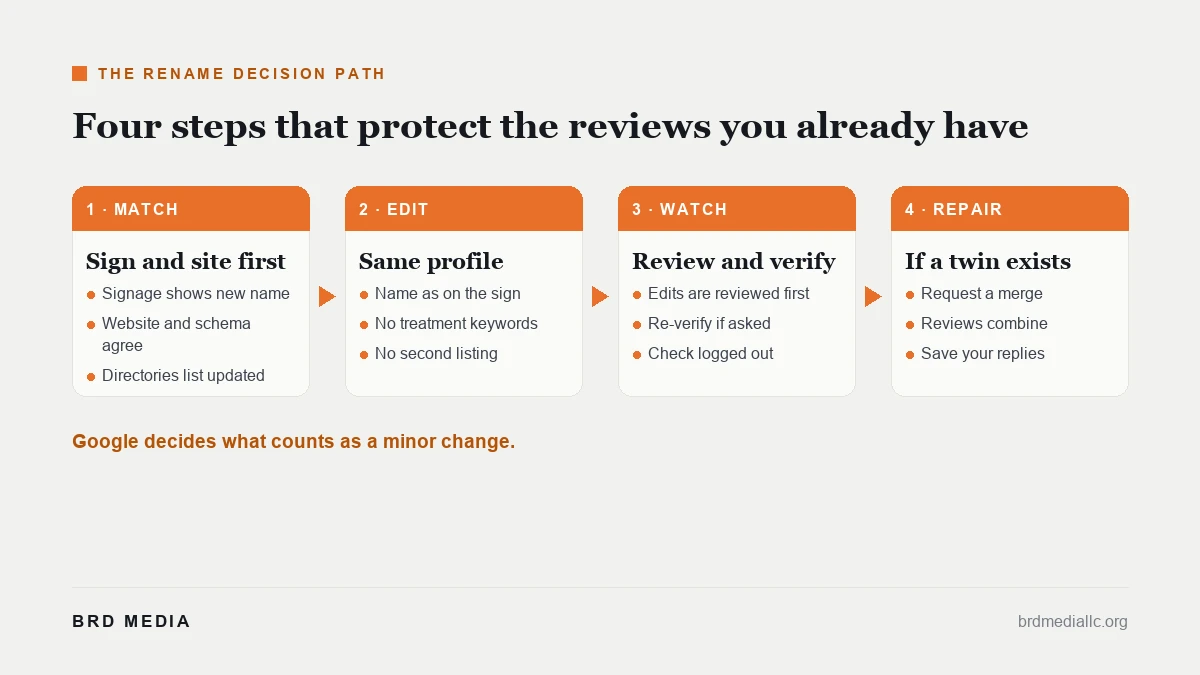
Google's guidelines say a name should reflect the business's real-world name, as used consistently on the storefront, and that unnecessary information in the name is not permitted. Google also expects businesses that show an address to keep permanent signage of their business name there. So the order of work is signage first and Google second.
Work through this list in one sitting, so the new name appears everywhere on the same week:
If the address changes in the same move, treat it as two changes. Google's editing page says that if you move to a new address after verification you must verify again. Our med spa SEO guide covers the profile, consistent name, address and phone details and treatment pages, which are the places a rushed rename leaves mismatches.
Name edits that add words are the ones most at risk, because Google's guidelines do not permit taglines or service descriptors in a name. For a med spa, the tempting additions are a treatment, a city or a phrase such as "best." Those belong in the description, the services list and the website copy, not in the name field.
Keep the name field to the name on your signage, and do not stretch it to imply a service or a credential the business cannot back.
Start by reading the status on the profile instead of resubmitting. Google's editing page points to an edit status check. If Google declined the name, compare it with the guidelines above and remove anything that is not the signage name. When Google asks to verify again, finish it with the account that manages the profile.
If Google suspends or disables the profile, its help page says it may suspend profiles that do not follow its guidelines. It also points to an appeals tool. You can submit an appeal only once. So gather evidence first: a business registration, a license, tax certificates or utility bills, with the business name and address matching the profile. The same page says not to create a new profile for the same business. Our map pack post has a section on suspension and reinstatement that goes further on how clinics handle this.
The takeaway: a rejected edit is usually fixable. A second profile opened in a hurry is what turns a fixable edit into a long cleanup.
Google's help page on resolving duplicate profiles says you can merge two profiles when they represent the same business and have the same information. It says you make merge requests as a suggestion in Google Maps, and Google reviews them. When two profiles merge, their reviews combine, but you may lose replies to reviews. If your replies matter, save a copy before you request the merge.
The other route is the moving-reviews page. It describes contacting Google to transfer reviews from the old profile to the new one. That applies when someone created a new profile by mistake after a change in location or ownership. Its wording is about location and ownership, not a rename. So ask Google support which path applies to your situation, and keep your registration papers and photos of the sign ready. Expect to prove that both profiles are the same business.
While this is in progress, avoid asking patients to repost reviews on the new profile. If you want to grow the review count again later, our guide to getting Google reviews without breaking HIPAA has request scripts. They keep patient details out of the message.
Check the public profile in a logged-out browser the day the edit goes live, then again a week later. Confirm the name, address, phone and website link are right, the review count did not change, and no second profile shows for the spa. Search the new name and the old name on Google and Maps and note which one the profile appears under.
The honest take: The safest rename is the one that edits the profile you already have and makes every public source agree. Opening a second listing, adding a treatment word to the name or changing the sign last are the moves that create the problems this post describes. Nothing here can promise how Google will classify your change, so get the facts in order first and ask Google support when the change is more than a small edit.
A rename touches the profile, the website and the places that copy your details, which is local SEO work you should do once and do cleanly. Our med spa SEO work covers the profile, the treatment pages and the tracking that tells you whether the change moved calls. For the wider picture of how a med spa books consults from search, see our med spa marketing overview. Engagements start at $2,500 a month on a six-month term; the three tiers are on our pricing page. Ad spend is separate and belongs to you.
Send us the old name, the new name and the places your name appears. We will map the order of work before you submit.
Book a consultSources: Edit your Business Profile · Move your reviews across Business Profiles · Resolve duplicate profiles and ownership issues · Guidelines for representing your business · Fix suspended or disabled profiles · Tips to improve your local ranking
Cite this page. Credit BRD Media with a dofollow link to this page: https://brdmediallc.org/med-spa-google-business-profile-rename-keep-reviews/
See BRD Media first in Google
Add us as a preferred source and our SEO breakdowns rank higher in your own Search results, AI Mode and AI Overviews.