
A new patient sits down and says the assistant on their phone told them to call you, and that it called your reviews good. It is a pleasant surprise the first time. By the third or fourth time, the practice manager asks a fair question: how do we count this? The honest answer to how to track new dental patients from ChatGPT is that you cannot count it perfectly, but you can build a record that is good enough to tell you whether it is happening and how often. This post gives you the intake wording, the analytics view, a monthly check and a log you can start this week.
When a patient finds a practice through an assistant, much of the evidence can live in the patient's head and on the patient's phone. Your website may never see the question they asked or the answer they got. The person who hears about it is whoever books the appointment or greets the patient at the first visit.
That makes the front desk the most useful tool you have. A team member who asks the same question, in the same words, every time, builds a record that no dashboard can build for you. Our post on dental new patient attribution covers the general habit of asking how a patient found you. This post adds what to do when the answer involves an AI assistant.
Give the form a fixed list of options and let the patient pick more than one. Add a plain option for the assistants, worded the way a patient would say it, for example "An AI assistant such as ChatGPT". Keep the other options separate so the list stays honest: a friend or family member, a map listing, a Google search, a review site, a mailer, an insurance directory and "other".
Then add one follow-up question for anyone who picks the assistant option, or who says they "asked the computer" or "looked it up on my phone". Ask what they typed or said, and write the answer in their words. A short note such as "asked for a dentist near the office who takes our insurance" teaches you more than a tick box does, because it shows which questions bring patients to you.
Your analytics tool groups visits by where they came from. In Google Analytics, the way a visit is grouped depends on the source and medium that arrive with it, which Analytics Help explains in its page on the default channel group. A visit from a link inside an assistant may show up under a referral source with the assistant's website name, or it may arrive with no source at all and be grouped as direct. Which one you see depends on the assistant, the device and the way the person opened the link, so check your own report rather than trusting a general claim.
Here is a sensible way to use it.
Google also explains how traffic-source fields are scoped to the user, the session or the event in its scopes of traffic-source dimensions page. That matters here because the session source and the first user source can differ. A patient who first met your practice through an assistant and returned a week later by typing your name can show a different source on the second session, while the first user source keeps the original. Analytics reports what the browser sent, not what the patient intended.
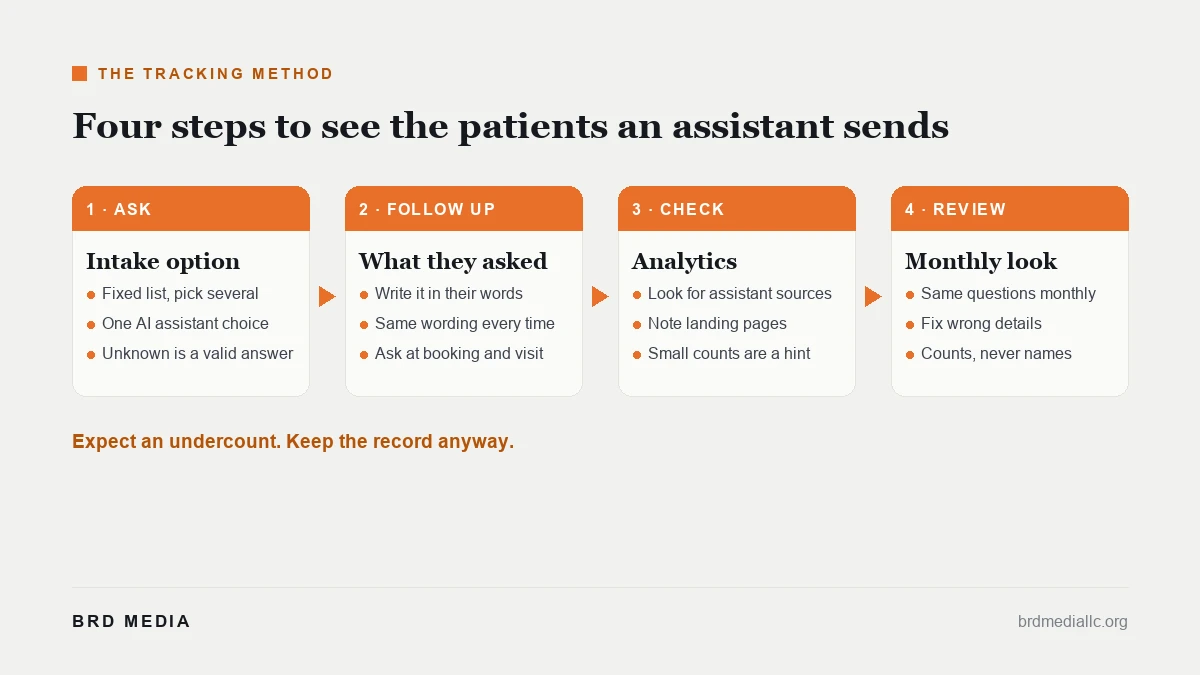
Once a month, ask the assistants the questions a patient might ask and write down what they say about you. Use plain wording, such as "dentist near [your neighborhood] for a nervous patient" or "dentist near [your neighborhood] that takes [your insurance]". Run the same list each month so the results are comparable.
For each answer, record four things: whether your practice was named, what the assistant said about it, which other facts it got right or wrong (hours, services, address), and which sources it cited if it showed any. You are not trying to rank. You are looking for errors you can fix, because an assistant that lists an old phone number or a service you no longer offer sends patients to a wrong first impression. Our guide to AI search for dentists explains how these answers get built and what a practice can do about them.
Two cautions apply. Assistants can give different answers to the same question on different days, so one check proves little and a run of checks shows a pattern. And what an assistant says about you is not something you control directly. What you control is the information it can find: your listing, your site and your reviews.
A simple table is enough. Keep one row per new patient, with no names, and review the totals at the end of each month.
| Date | What the patient said | Source logged | Follow-up note |
|---|---|---|---|
| Week 1, Mon | "I asked an assistant for a dentist near work" | AI assistant | Asked for an office near the train, new patient exam |
| Week 1, Wed | "I found you on Google" | Friend, then Google search | Second question: friend told them first, then searched the name |
| Week 2, Tue | "My daughter looked you up" | Family | She may have used an assistant, unknown |
| Week 2, Fri | "I don't remember" | Unknown | None |
The rows above are an example of the format, not real patient data. The point of the last column is to keep the patient's own words next to the tick box. After a month or two, read the notes aloud in a team meeting. Patterns that a count cannot show tend to appear: the same neighborhood, the same insurance question, the same worry about a past bad visit.
A patient can meet your practice through an assistant and then do something else before booking. They may copy the practice name into Google to check the reviews. They may tap the phone number straight from the answer without ever visiting the site. They may ask a spouse who says "yes, I know that office". Each of those paths ends with the patient saying "Google" or "a friend", and each is a truthful answer.
This is why the follow-up question matters. "Where did you first hear about us?" and "How did you book?" can have different answers, and both are worth recording. If a patient says "Google" and then tells you the assistant gave them your name first, log the first touch as the assistant and the booking path as Google. Our dental practice marketing guide covers the other channels these patients can come through, including the map listing, reviews and patient reactivation.
Be clear with your team about what the record can and cannot say.
Do not collect more patient detail than you need. A source tick box and a short note about what the patient searched for do not require any health information, and the log should stay that way. Ask your compliance advisor how your practice handles intake notes before you add fields.
The honest take: nobody can tell you exactly how many of your patients came through an assistant, and any tool that gives you a clean number is guessing. A rough record kept every week is worth more than a precise one kept once. Start with the intake option and the monthly check, and let the notes show you what is worth a closer look.
Tracking patients who mention an assistant is part of knowing which of your channels is working, alongside your map listing, your site and your referral work. Our dental SEO work builds the pages and listing details that those assistants draw from, and our dental marketing work reports on calls and booked appointments, so this log can sit next to a monthly report that goes past clicks. Engagements start at $2,500 a month on a six-month term; the three tiers are on our pricing page. Ad spend is separate and belongs to you.
Send us your current new-patient form. We will mark up a fixed-option version and a one-page monthly check.
Book a consultSources: Analytics Help, Default channel group · Analytics Help, Scopes of traffic-source dimensions
See BRD Media first in Google
Add us as a preferred source and our SEO breakdowns rank higher in your own Search results, AI Mode and AI Overviews.